Kitchen Display System
Kitchen display system for a paperless, faster kitchen.
Orders appear on kitchen screens the moment they're punched — in sequence, by station, with clear status — so nothing gets lost or forgotten.
- Live order queue
- Station-wise screens
- One-tap status
Kitchen Display System
Everything your kitchen team needs to see
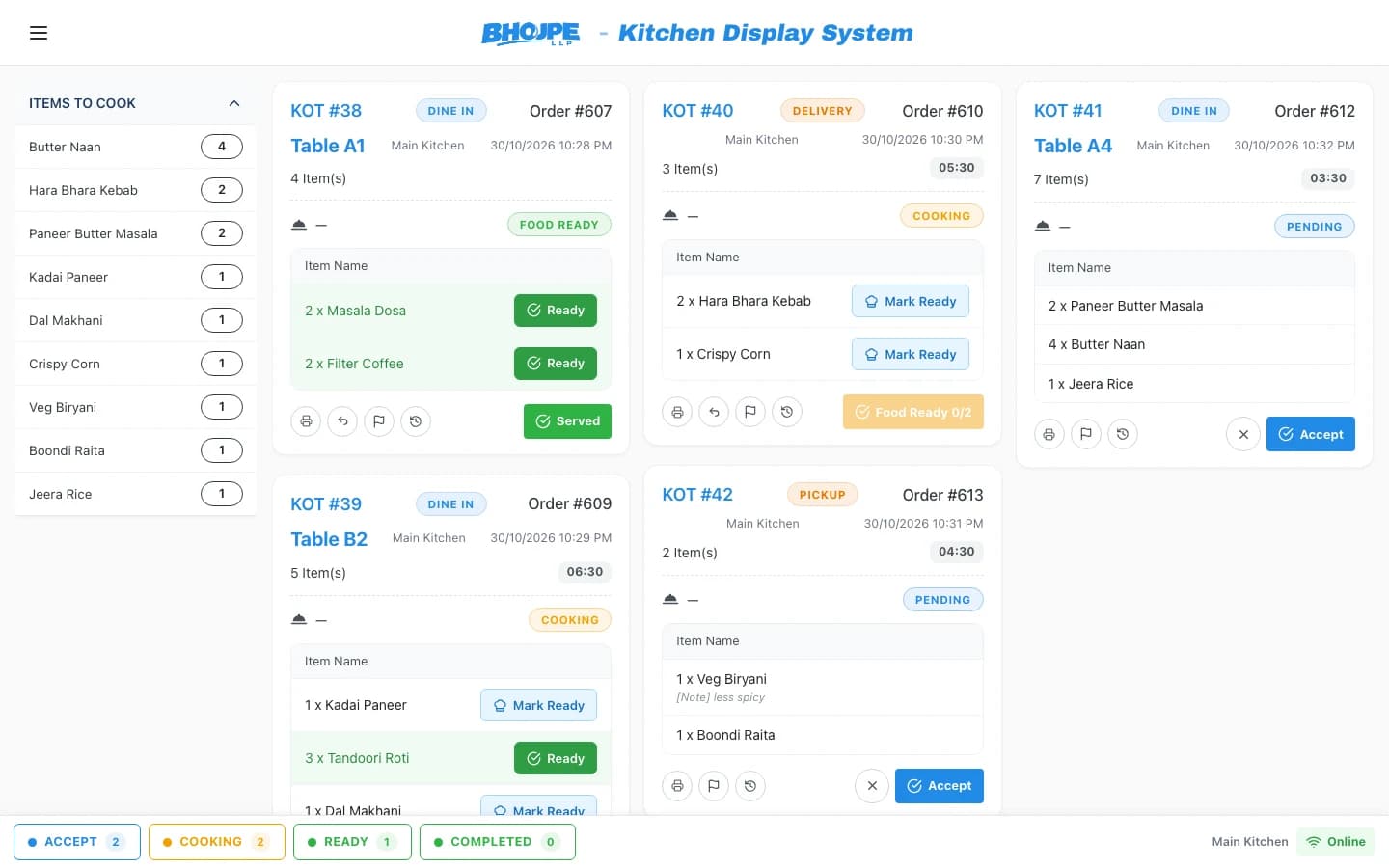
Live order queue
Orders appear in the sequence they were placed.
Station-wise screens
Tandoor, Chinese, bar — each sees only its items.
One-tap status
Mark orders as cooking and ready.
Order timing
See how long each order has been waiting.
Notes & modifiers
Special requests show clearly on every ticket.
Ready alerts
Front of house knows when an order is ready.
Order flow
From captain to chef, instantly.
Orders from the counter, Captain App and delivery all land on the same kitchen display.
- No handwritten KOTs
- Nothing lost on the way
- Clear priority
Front of house
Waiters know when food is ready.
Ready status is visible to the floor team, so dishes go out hot and guests aren't kept waiting.
- Ready status for captains
- Table-wise view
- Smoother service
When a kitchen is ready to replace paper KOTs
Paper works until it does not. Tickets get wet, fall behind the counter or pile up with no clear order, and nobody can tell how long a table has been waiting. A kitchen display system replaces the pile with a screen where orders appear in sequence, each showing how long it has been waiting.
Each kitchen sees only its own items, so the tandoor is not reading the bar's order. Chefs accept an order and mark it ready with a tap, and that status reaches the floor team, so food does not sit on the pass. Preparation time set on a menu item drives the target on the ticket, and running late becomes visible instead of a surprise.
You do not have to convert everything at once. Some kitchens can stay on printed KOTs while others move to a screen. Orders from the counter, the Captain App and delivery all arrive in the same queue.
- Kitchen-wise screens with order timing
- Accept and ready status in one tap
- Printers and screens can run together